
Before You Launch Your Vibe-Coded App, Please Check the Doors
Vibe coding makes it easy to ship apps fast. It also makes it easy to ship exposed databases, leaked API keys, bot-friendly forms, and legal trouble.

Vibe coding has done something wonderful. It has let people build.
People who would never have opened an IDE are now shipping tools, dashboards, mini-SaaS products, marketplaces, forms, directories, AI wrappers, booking systems, internal apps, and little digital contraptions that may or may not survive contact with reality.
This is good. Mostly.
The problem is that many of these apps are going straight to real users with the security posture of a cardboard shed in a rainstorm. And then the predictable things happen.
A Supabase bill jumps from $20 to $200. Bots fill every public form before lunch. A database is accidentally readable from the browser. An API key appears in the frontend like a small financial suicide note.
Someone receives a legal email with phrases like “cease and desist,” “personal data,” and “regulatory non-compliance.” This is not because vibe coders are stupid. It is because shipping became easy faster than operating became obvious.
So before you launch your beautiful little AI-built app into the world, run the boring checklist. The boring checklist is what keeps the beautiful little app from becoming a legal and financial bonfire.
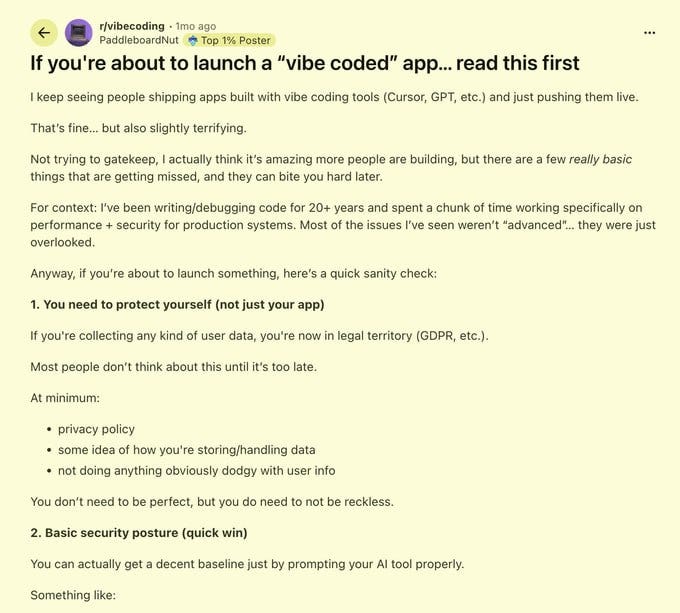
1. Protect Yourself, Not Just the App
The moment you collect user data, you are no longer just “building a thing.” You are in legal territory. GDPR. CCPA. Privacy policies. Data storage. Deletion requests. Consent. Security. The whole delightful buffet of modern compliance.
You do not need to become a lawyer overnight. But you do need to know: what user data you collect; where it is stored; who can access it; how users can delete it; what third-party services receive it; what your privacy policy says.
Most people think about this after something goes wrong. That is the wrong time.
A privacy policy is not magic armor, but having no idea what happens to user data is how you end up explaining your weekend project to people with letterhead.
2. Turn On Row Level Security
If you are using Supabase, learn these three letters: RLS.
Row Level Security.
Without it, your app may look fine from the UI while your database is quietly sitting behind the curtain wearing no trousers. If your policies are missing or wrong, a curious user can open DevTools, poke around the client, and possibly read data they should never see. This is not advanced hacking. This is “teenager with Wi-Fi” territory.
In Supabase, go to Auth → Policies and make sure tables are not effectively open to the world. This often takes minutes to fix. It can take months to recover from ignoring.
3. Test the Ugly Paths
Most people test only the happy path. Sign up. Log in. Click the button. See the success message.
Wonderful. The app works, provided all users behave like polite furniture. Real users do not.
Try the annoying things: enter the wrong password five times; reset a password for an email that does not exist; open the same confirmation link twice; register with an email already in use; submit an empty form; upload the wrong file type; paste 5,000 characters into a field meant for 50; open the app in two tabs and race actions against each other.
This is where authentication bugs live. Not on the sunny main road. In the ditch.
4. Ask AI to Review Security
This is one of the rare cases where “ask AI” is actually sensible.
Give your AI tool the app context and ask: “Review this application as a security engineer. Check for weak security headers, unsafe defaults, exposed secrets, insecure API routes, missing authorization checks, and basic production-readiness issues.”
Will it catch everything? No.
Will it catch obvious mistakes that you missed because you were too busy admiring your gradient buttons?
Often, yes.
That alone makes it worth doing.
5. Run an OWASP Pass
OWASP is not some mysterious temple. It is the basic map of common web app mistakes.
Ask your AI: “Review my application against OWASP recommendations and highlight possible vulnerabilities, especially SQL injection, XSS, authentication flaws, broken access control, and sensitive data exposure.”
Again, this is not a substitute for a real audit. But before a public launch, it is a very cheap sanity check. If your AI finds something obvious, good. You have just saved yourself from discovering it through a stranger on Twitter.
6. Never Trust Client-Side Validation
Client-side validation is for user experience. Server-side validation is for reality.
A malicious user can disable JavaScript, skip your form, call the API directly, edit payloads, change hidden values, and generally behave like a raccoon in a payment system.
So every important check must happen on the server: permissions; field limits; user ownership; input validation; payment state; role access; file type; rate limits. If the frontend says “you are not allowed” but the backend shrugs and processes the request anyway, you do not have security. You have theatre.
7. Check for Data Leaks
AI-generated code loves to leak things in very boring ways.
Common examples: .env values accidentally exposed to the frontend; API responses returning entire user objects instead of only needed fields; admin data included in normal responses; debug logs containing tokens; error messages exposing database queries; server logs containing emails, keys, or private user content.
Ask your AI: “Check this app for credential leaks or sensitive data exposure in frontend code, API routes, logs, environment variables, and response payloads.”
The correct amount of secret data in the browser is zero. If an API key appears in the frontend, assume it is already compromised. Rotate it. Move the call server-side. Use a proxy. Do not negotiate with the corpse.
8. Rate Limit Everything Expensive
This one is not just security. It is financial survival.
Any endpoint that calls a paid API should have rate limiting. AI calls. Email sends. SMS. Image generation. Database-heavy search. Web scraping. Embeddings. File processing. Anything that costs money per request.
Without rate limiting, one bored bot can turn your launch day into a small invoice-shaped tragedy.
Cloudflare, Upstash, middleware, server limits, provider-level caps — use something.
Do not rely on “nobody will find this endpoint.” They will. Or worse, the bots will. Bots have more free time than humans and fewer moral commitments.
9. Add CAPTCHA to Public Forms
If your app has a public form, add bot protection. Newsletter signup. Contact form. Waitlist. Comment box. Account registration. Lead form. Anything public.
Cloudflare Turnstile is free and usually painless. Add it. Restrict CORS to your actual domain. Block obvious abuse. This is not elegant. It is necessary.
A public form without protection is not an interface. It is an invitation.
10. Do Not Show Internal Errors to Users
Never show users messages like: SELECT * FROM users failed
Database connection error: relation auth.users does not exist
JWT_SECRET missing
Stripe webhook signature invalid: expected...
To users, show something neutral: “Something went wrong.” “User not found.” “Unable to process this request.”
Keep the details in server logs. Internal errors are useful to developers and attackers. Your user is only one of those.
11. Ship Slower Than Your Panic
The real danger of vibe coding is not that AI writes bad code.
Humans also write bad code. We have been doing it for decades with great confidence and worse variable names.
The danger is that AI makes it easy to skip the boring parts. The legal check. The auth check. The server validation. The RLS policy. The rate limit. The CAPTCHA. The logging cleanup. The “what happens if someone is not nice?” test.
That is where new builders get hurt. Not in the feature. In the launch.
The Verdict
Vibe coding is fantastic. But deploying a vibe-coded app without basic protection is like opening a nightclub because you successfully assembled a chair.
You are not done. You have just discovered furniture.
Before launch, protect the data, lock the database, test the ugly paths, rate-limit the expensive endpoints, hide internal errors, and assume the first visitor may be a bot, a lawyer, or someone with DevTools and emotional problems.
Build fast. But do not be reckless.
The internet is not impressed by your prototype. The internet is hungry.